See every byte.
Reclaim every gigabyte.
Argus Cleaner scans your drive at lightning speed, shows you where your space goes and cleans it safely. Free, offline, in your language.
New in 3.0: Argus sees everything
Three new ways to look at your PC — all measured, all offline.
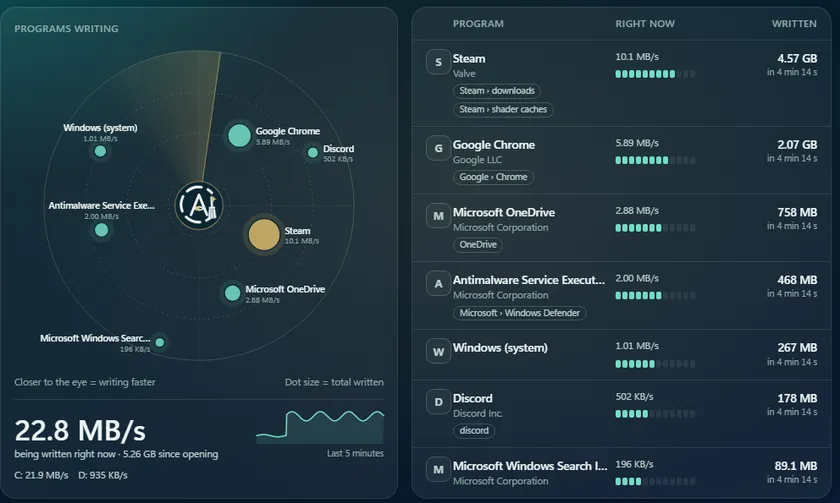
Radar
Who is writing to your disk and talking to the Internet, live — and it warns you when a program steps out of its habits: writing far more than usual, sending a lot over the Internet, renaming your files en masse.
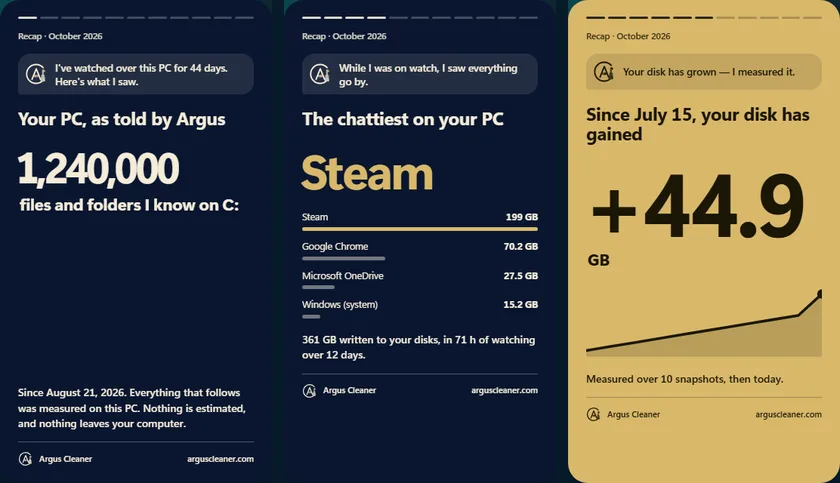
Recap
Argus tells your PC's story like a companion who knows it by heart, with a year-end recap: space taken back, the chattiest program, the record day, your disk's growth. Shareable cards, with no file names at all.
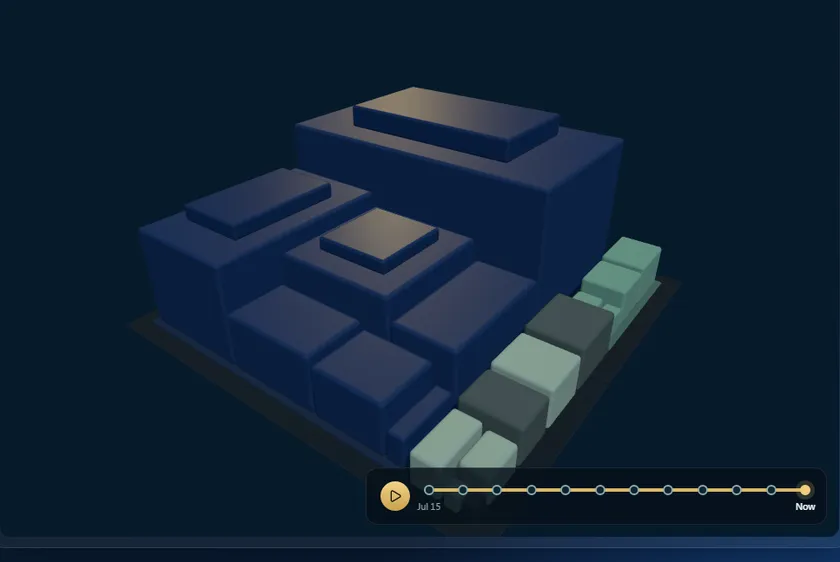
3D map
Your disk in relief, rotating on its own: capture the image in one click, and go back in time from snapshot to snapshot — whatever grew is outlined in copper.
Screenshots of the app in demo mode.
Everything you need to master your drive
A complete arsenal, one goal: every byte in its place.
Two ways to see your drive
One analysis, two perspectives: the treemap for the instant overview, the 3D map for exploration.
Treemap
Every file becomes a rectangle proportional to its size: whatever devours your space jumps out instantly. Click to dive from folder to folder, all the way to the guilty file.
3D map
Your drive in relief, like a city: every building is a file, its height is its size. Rotate with the mouse, navigate with the arrow keys — with a selection designed to never open anything by accident.
A safety engine that thinks
Argus classifies every item before you touch anything.
Can be deleted
Caches, temporary files, duplicates: they all come back on their own.
Look before deleting
May affect an application. Argus tells you which one.
Do not touch
Vital for Windows. Argus blocks the truly critical areas.
Built to earn your trust
No empty promises — guarantees you can verify yourself.
One tool, everything you need
Where you'd usually need several programs, Argus brings it all together — for free.
| Feature | Argus | Disk visualizers | Cleaners | Uninstallers |
|---|---|---|---|---|
| Instant scan (MFT) | ✓ | ✓ | ✕ | ✕ |
| Navigable 3D map | ✓ | ✕ | ✕ | ✕ |
| Safe cleanup + score | ✓ | ✕ | ✓ | ✕ |
| Content-based duplicates | ✓ | ✕ | ✕ | ✕ |
| Uninstall + leftovers | ✓ | ✕ | ✕ | ✓ |
| Disk SMART health | ✓ | ✕ | ✕ | ✕ |
| Debloat & privacy | ✓ | ✕ | ✕ | ✕ |
| 100% offline, no ads | ✓ | — | — | — |
Indicative comparison by software category. Each product has its strengths — Argus brings them together in one free app.
Frequently asked questions
Is Argus really free?
Is it dangerous for my system?
Why administrator rights?
Is my data sent anywhere?
Why does Windows show “unknown publisher”?
What languages is Argus available in?
How do I find out what's taking up space on my hard drive?
Is Argus a good free alternative to CCleaner?
How do I free up disk space on Windows 10 and 11?
How do I find and delete duplicate files?
Ready to see every byte?
Free, no account, no ads, no telemetry.
Download Argus Cleaner36f2e7e75d15754b69caf7a131d60297fe216147fa940368aec40b5539216ea3
Support the project
Argus Cleaner is free and will stay free. If the app helps you, a donation keeps development alive.
A5nJy1571KQtqQKkTLwHbJAKyJg8PZWCCUfXmXR1t4b7
As seen in the press
Argus Cleaner spotted and tested by specialist tech press — without a cent of advertising.
Changelog
- The built-in update works in every folder — If Argus was stored in a folder whose name has non-English letters (Russian, accents…), the update button failed with the message “cannot find Argus Cleaner.exe”. Your version stayed intact but did not update. This is fixed. If it happened to you, download this version once from the website: the next ones will install on their own.
- Disk health translated — The word “Attention” shown for a disk to watch stayed in French in every language.
- Argus speaks your language better — A few sentences were still in French in the other languages: the verdict on an open folder, the timeline (“new folder”, “grew”…), the Recycle Bin, and the “No AI” profile in Debloat. They are now translated in all 14 languages.
- Singular done right — Argus now writes “1 setting” and “1 launch”, no longer “1 settings”.
The free PC cleaner that shows you the truth about your disk
Argus Cleaner is a free disk space analyzer and cleaner built for Windows 10 and 11. Where most cleaners just wipe a few caches blindly, Argus reads your disk's NTFS table directly and draws a complete map — treemap and 3D view — of everything taking up your space. In seconds, you finally see what's using space on your hard drive or SSD.
In a single 100% free, offline tool, you free up disk space safely: color-coded cleanup by risk, content-based duplicate detection, deep uninstall with leftover removal, SMART disk health and Windows optimization. It's a free alternative to CCleaner that brings together what usually takes several programs.
No ads, no account, no telemetry: your data never leaves your PC. Download Argus Cleaner, run the scan and reclaim gigabytes — without ever risking the vital files of Windows.